How to turn a router into an Access Point
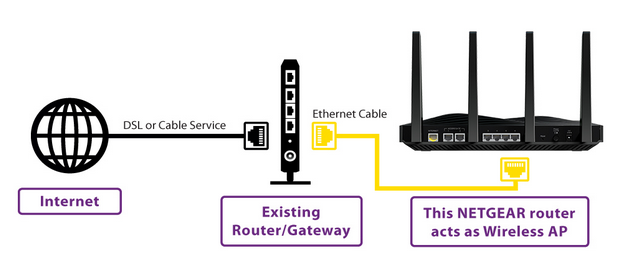
If you’re comfortable with configuring routers and networking in general, what follows is the general direction you’ll want to take. If you’re new to networking, I’d recommend first reading this post about setting up a home router first. When you’re done, follow the “Detailed steps” below.
1. Cover Router B’s WAN (Internet) port with a piece of tape. You’ll want to avoid using the port as doing so would prevent you from converting the router into an AP.
2. Find out what router A’s range of IP addresses is. For example, if Router A’s IP adress is 192.168.1.1 then we can safely assume its IP pool ranges from 192.168.1.2 to 192.168.1.254.
3. Manually set Router B’s IP address to an unused IP within Router A’s IP range. For example, you can make it 192.168.1.2. Just make sure you haven’t and will not manually use this IP for any other device.
4. Turn off Router B’s DHCP function.
And you’re done. Now if you connect Router B (which is no longer a router) to Router A using a network cable (from LAN port to LAN port), it will function as an Access Point giving you better Wi-Fi range for your devices.
Ref: https://www.cnet.com/home/internet/how-to-turn-an-old-wi-fi-router-into-an-access-point/
